
A step-by-step 2026 guide for UK employers on how to register for PAYE, set up payroll, and meet your RTI obligations from day one — whether you are taking on your first employee or paying yourself a director’s salary.
Setting up PAYE correctly from the start is one of the most important steps any new employer takes. Get it wrong — missing RTI submissions, applying the wrong tax codes, failing to register before the first payment — and HMRC penalties follow quickly. This guide takes you through every step so your PAYE scheme runs correctly from day one.
When Do You Need to Set Up PAYE?
You must register as an employer and set up a PAYE scheme before you make your first wage or salary payment if any of the following apply:
- You are paying an employee at or above the Lower Earnings Limit (£123 per week in 2026/27)
- You are a limited company director paying yourself a salary through the company
- You have an employee who has another job or receives a pension
- You are providing benefits in kind to employees that need to be payrolled
You do not need a PAYE scheme if you are a sole trader or a partnership with no employees, or if you are a director of your own company taking income purely as dividends with no salary at all. However, most directors pay at least a small salary to take advantage of the personal allowance and preserve National Insurance credits — and that requires PAYE registration.
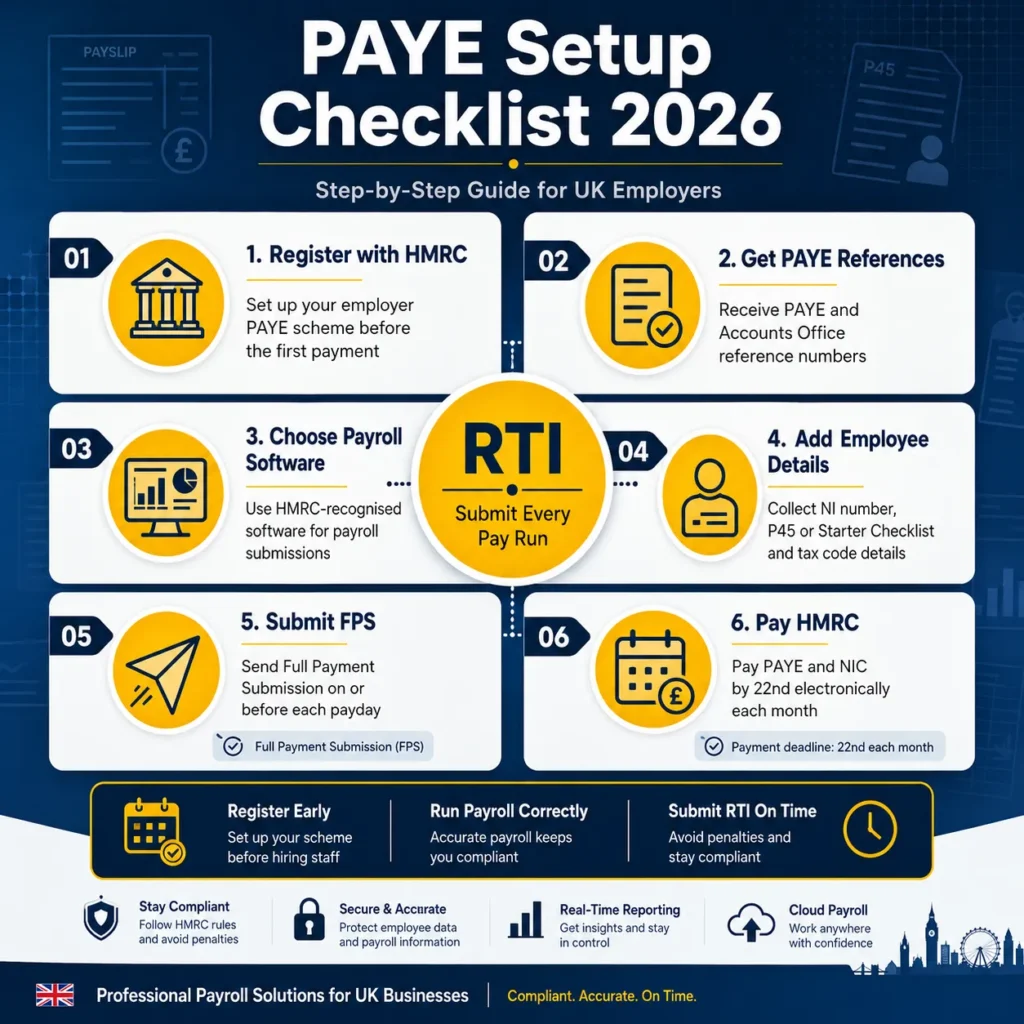
Step-by-Step: How to Set Up PAYE in 2026
Step 1: Register as an Employer with HMRC
Register online through the HMRC employer registration service. You will need your Government Gateway user ID and password. If you do not have a Government Gateway account, create one during the registration process.
You can register up to two months before you start paying people. HMRC will send you a PAYE reference number and an Accounts Office reference number — you will need both for all future payroll submissions. Allow up to five working days to receive these by post. Register early; you cannot make your first RTI submission without these references.
Step 2: Choose Your Payroll Software
All payroll submissions to HMRC must be made using HMRC-recognised payroll software. HMRC’s Basic PAYE Tools is available free of charge for employers with fewer than 10 employees. For most growing businesses, commercial software such as Xero, QuickBooks, Sage, or BrightPay is more practical as it handles RTI submissions, payslip production, and integration with accounting records automatically.
Step 3: Gather Information for Each Employee
Before your first pay run, you will need the following for each employee:
- Full legal name, date of birth, and address
- National Insurance number
- Start date and agreed salary or hourly rate
- P45 from their previous employer, or a completed HMRC Starter Checklist if no P45 is available
- Student loan plan details (Plan 1, Plan 2, Plan 4, or Postgraduate Loan), if applicable
Step 4: Determine Each Employee’s Tax Code
The tax code tells your payroll software how much of each employee’s pay to treat as tax-free before applying Income Tax. HMRC issues tax codes directly to employers through PAYE coding notices (P6 and P9). Until you receive a coding notice, apply the following defaults:
- If the employee has a P45 with a tax code, use the code and week/month number from the P45
- If the employee has no P45 and the Starter Checklist indicates this is their first job since last 6 April: use the standard 1257L code on a cumulative basis
- If the employee has another job or pension, use the 0T code on a non-cumulative basis until HMRC issues the correct code
Step 5: Run Payroll and Submit the Full Payment Submission (FPS)
Every time you pay an employee, you must submit a Full Payment Submission (FPS) to HMRC on or before the payment date. The FPS includes each employee’s pay, tax, and National Insurance deductions for that pay period. This is the core of Real Time Information (RTI) — HMRC knows what every employer pays every employee in real time, in every pay period.
Missing an FPS or submitting it late triggers an automatic penalty from HMRC. The penalty is currently £100 per month for employers with one to nine employees, rising to £400 per month for employers with 250 or more. Late FPS submissions are one of the most common payroll compliance errors for new employers.
Step 6: Submit an Employer Payment Summary (EPS) When Needed
An Employer Payment Summary (EPS) is submitted to HMRC to adjust what you owe, claim reductions, or report periods with no employees paid. You will need to submit an EPS to:
- Claim the Employment Allowance (up to £10,500 in 2026/27)
- Recover statutory maternity, paternity, or sick pay payments
- Report a period in which no employees were paid (so HMRC does not chase a missing FPS)
- Confirm the final submission of the tax year
Step 7: Pay HMRC What You Owe Each Month
Each month, you owe HMRC the Income Tax and National Insurance you have deducted from employees, plus your employer NIC liability. Payment is due by the 19th of the following month (cheque) or 22nd (electronic). For example, PAYE and NIC deducted during the tax month ending 5 June must be paid to HMRC by 19 or 22 July.
If your total PAYE and NIC liability is less than £1,500 per month on average, you can request quarterly payment instead of monthly. This can ease cash flow for very small employers with low payroll costs. Contact HMRC or your accountant to arrange quarterly payment.
Key 2026/27 Payroll Figures Every Employer Needs
| Rate or Threshold | 2026/27 Amount |
|---|---|
| National Living Wage (aged 21+) | £12.71 per hour (from 1 April 2026) |
| National Minimum Wage (18–20) | £10.85 per hour (from 1 April 2026) |
| Employer NIC secondary threshold | £5,000 per year / £417 per month |
| Employer NIC rate above secondary threshold | 15% |
| Employee NIC primary threshold | £12,570 per year |
| Employee NIC main rate (below UEL) | 8% |
| Employment Allowance | £10,500 per year |
| Lower Earnings Limit (LEL) | £123 per week / £533 per month |
| Standard tax code | 1257L |
ℹ️ Director PAYE: One Important Difference
Directors of limited companies are treated as office holders rather than employees for NIC purposes. This means director NIC is calculated on an annual (cumulative) basis rather than per pay period. The practical effect is that a director paid a lump sum at the start of the year may trigger NIC liabilities differently from an employee paid the same amount monthly. Most payroll software handles this automatically, but it is worth confirming your software is set to director mode for the relevant employee records. Our payroll outsourcing service configures director payroll correctly from day one.
Auto Enrolment: Do Not Forget Your Pension Duties
As soon as you take on an employee (or become a director taking a salary above the earnings trigger), auto enrolment duties apply. Eligible employees must be automatically enrolled into a qualifying workplace pension scheme. The minimum total contribution is 8% of qualifying earnings (at least 3% employer, at least 5% total). You must declare your compliance to The Pensions Regulator within five months of your staging date or duties start date.
Sole directors with no other employees can apply to The Pensions Regulator for an exemption from auto enrolment. If you have other employees, auto enrolment is mandatory. Failure to comply carries escalating penalties from The Pensions Regulator starting at £400 for small employers.
Taking On Your First Employee or Setting Up Director Payroll?
Our payroll outsourcing service registers your PAYE scheme with HMRC, configures your payroll software, and handles every RTI submission, payslip, and year-end filing. Fixed fee, no surprises.
View Payroll ServiceFrequently Asked Questions
How do I register for PAYE with HMRC?
Register online through HMRC’s employer registration service using your Government Gateway account. You will receive a PAYE reference number and an Accounts Office reference number within five working days by post. You can register up to two months before making your first payment to employees. You cannot make RTI submissions without these references, so register before your first payroll date.
Does a limited company director need to be on PAYE?
Yes, if the director is receiving a salary from the company. Even a small salary — for example, £5,000 per year to align with the employer NIC secondary threshold — requires a PAYE scheme and RTI submissions to HMRC. A director who takes no salary at all and receives income only as dividends does not technically require a PAYE scheme, but most directors benefit from taking at least a minimal salary for National Insurance contribution purposes.
What is RTI and what happens if I miss a submission?
Real Time Information (RTI) is HMRC’s system for receiving payroll data. Every time you pay an employee, you must submit a Full Payment Submission (FPS) to HMRC on or before the payment date. If you miss a submission or submit it late, HMRC will issue an automatic late filing penalty. The penalty starts at £100 per month for employers with one to nine employees. HMRC monitors FPS submissions against expected payment patterns and will contact employers who appear to have missed a submission.
What is the Employment Allowance and can I claim it?
The Employment Allowance reduces your employer NIC liability by up to £10,500 per year in 2026/27. It is claimed through an EPS submission. The key restriction is that sole directors who are the only employee of their company cannot claim the Employment Allowance. If you employ at least one other person, you can generally claim it. The £100,000 employer NIC eligibility cap was removed from 2025/26 onwards, so there is no longer an upper limit on employer NIC liability that prevents a business from claiming.

Muhammad Bilal is a Fellow Chartered Certified Accountant (FCCA) and Director of Protax Consultants, a London-based accounting firm specialising in tax advisory, compliance, and business accounting services.
Bilal qualified with the Association of Chartered Certified Accountants (ACCA) in 2009 and later achieved FCCA status after gaining extensive professional experience. With more than 13 years of experience in accounting, taxation, and auditing, he advises SMEs, landlords, contractors, and charities on tax planning, compliance, and financial management.
As a registered HMRC agent, Bilal assists clients with Self Assessment tax returns, corporation tax planning, VAT compliance, payroll services, and HMRC enquiries.
Bilal holds a BSc (Hons) in Applied Accounting and leads the audit and compliance function at Protax Consultants.
Company Verification:
Protax Consultants Ltd – Company Number 14701253
View Companies House Record